

- LED TVs
- Smart TVs
- Hisense TVs
- Top LED TVs
- Moniters
- 32 Inch LED TVs
- 40 Inch LED TVs
- 55 Inch LED TVs

Printers, Uncategorized

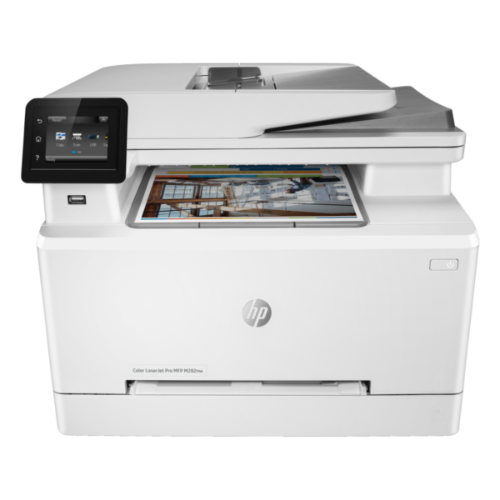
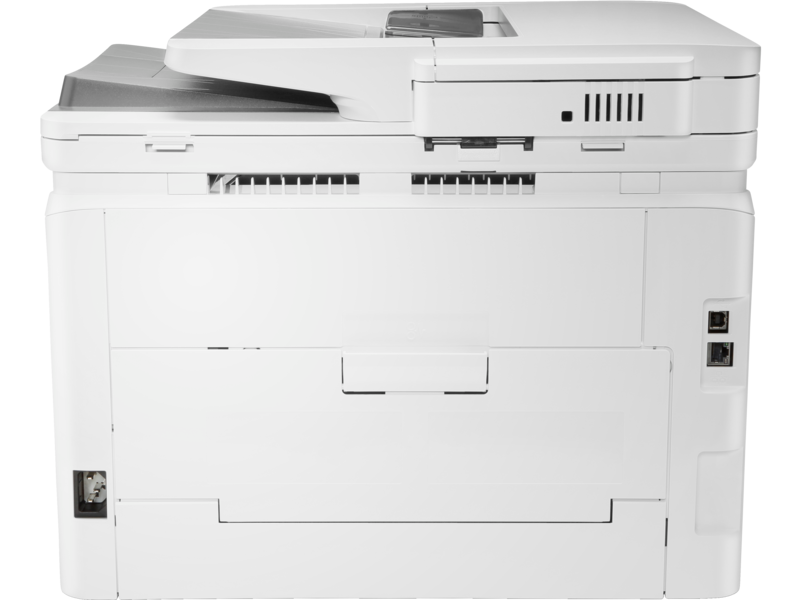
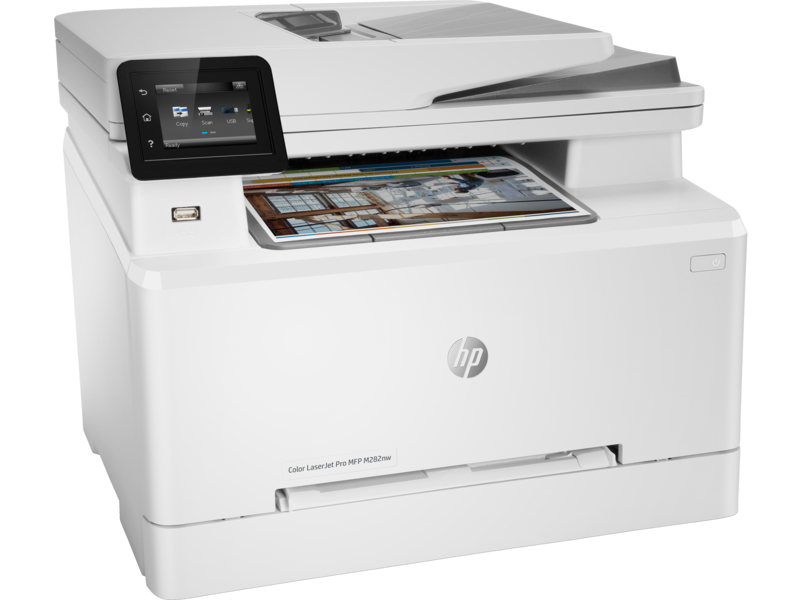
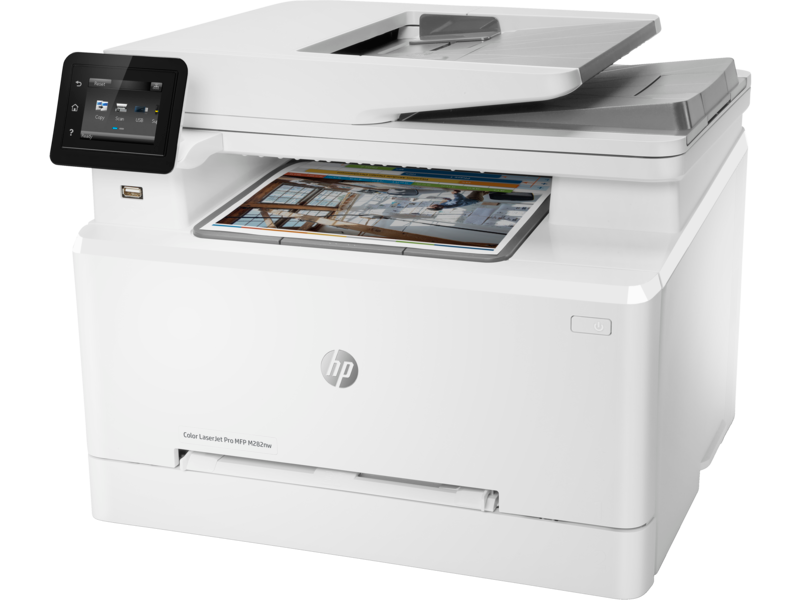
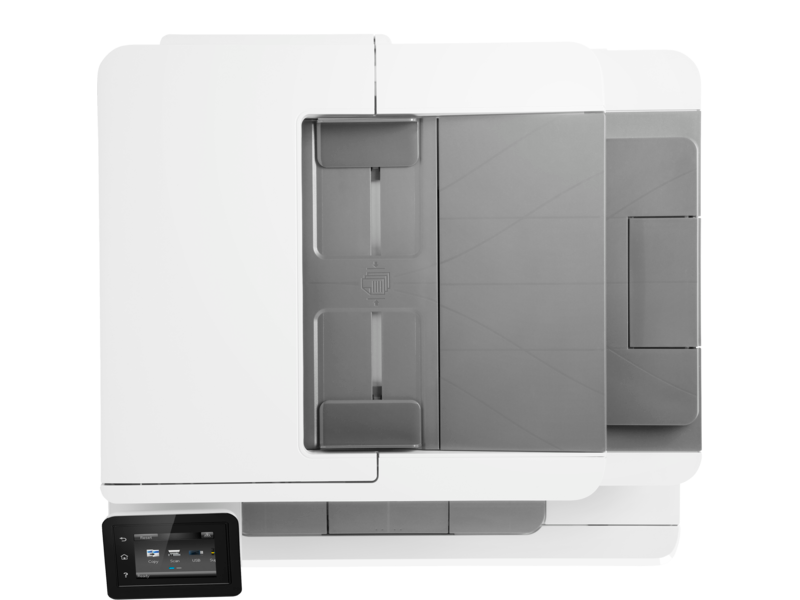
HP Color LaserJet Pro MFP M283fdw
An efficient, wireless MFP with fax for high-quality color and productivity.[2] Save time with Smart Tasks in HP Smart app, and print and scan from your phone.[3] Get seamless connections and strong security designed to help detect and stop attacks.
HP Personal Laser Multifunction Printers are designed for individuals or small workteams who need affordable, reliable multifunction performance in a compact and easy-to-use desktop device.
This printer is intended to work only with cartridges that have a new or reused HP chip, and it uses dynamic security measures to block cartridges using a non-HP chip. Periodic firmware updates will maintain the effectiveness of these measures and block cartridges that previously worked. A reused HP chip enables the use of reused, re-manufactured, and refilled cartridges
Compare
The HP Color LaserJet Pro MFP M283fdw is a versatile multifunction printer that is perfect for small and medium-sized businesses. It offers fast print speeds, high-quality printing, and a wide range of features that make it easy to stay productive.
This product is only Avalable On Request
Print Speeds That Keep You Moving
This printer can print up to 22 pages per minute (ppm) in black and white and 20 ppm in color. This means you can get your documents printed quickly and efficiently, without having to wait.
High-Quality Printing
This printer produces high-quality prints that are perfect for your business documents. The printer uses HP LaserJet technology to deliver crisp, clear text and vibrant colors.
Wide Range of Features
This printer offers a wide range of features that make it easy to stay productive. These features include:
- 250-sheet paper tray: This large paper tray means you can print long documents without having to refill the paper tray frequently.
- 2.7-inch color touchscreen: The color touchscreen makes it easy to control the printer and access its features.
- Dual-band Wi-Fi: This printer supports dual-band Wi-Fi, which means you can connect to your network on either the 2.4 GHz or 5 GHz band.
- Auto duplex printing: This feature automatically prints on both sides of the paper, which can save you paper and money.
Printing:
The HP Color LaserJet Pro MFP M283fdw delivers exceptional print quality with sharp text and vibrant colors. With print speeds of up to 22 pages per minute (ppm) in both black and white and color, you can quickly and efficiently print all of your documents. The printer also supports automatic duplex printing, which can help you save paper and reduce your environmental impact.
Copying and Scanning:
The HP Color LaserJet Pro MFP M283fdw is also a capable copier and scanner. The copier can produce high-quality copies in black and white or color, and the scanner can scan documents to a variety of formats, including PDF, JPEG, and TIFF.
Faxing:
The HP Color LaserJet Pro MFP M283fdw also has a built-in fax machine, so you can easily send and receive faxes from your computer. The fax machine supports a variety of fax resolutions and can send faxes to multiple recipients.
Connectivity:
The HP Color LaserJet Pro MFP M283fdw is easy to connect to your computer or network. The printer supports both Ethernet and Wi-Fi connectivity, so you can connect it to your network wirelessly or with a cable. The printer also has a USB port that you can use to connect it directly to your computer.
Control Panel:
The HP Color LaserJet Pro MFP M283fdw has a 2.7-inch color touchscreen that makes it easy to control all of the printer’s functions. The touchscreen is intuitive and easy to use, and it provides access to a variety of features, including print settings, scan settings, and fax settings.
Paper Handling:
The HP Color LaserJet Pro MFP M283fdw has a 250-sheet paper tray that can accommodate a variety of paper sizes, including letter, legal, and A4. The printer also has a manual feed tray that you can use to print on envelopes and other specialty papers.
Dynamic Security Enabled
This printer is equipped with HP’s Dynamic Security technology, which helps to protect your printer from malware and other threats.
Perfect for Small and Medium-Sized Businesses
This printer is perfect for small and medium-sized businesses that need a reliable and versatile printer. It offers fast print speeds, high-quality printing, and a wide range of features that make it easy to stay productive.
Conclusion
The HP Color LaserJet Pro MFP M283fdw is a great choice for small and medium-sized businesses that need a reliable and versatile printer. It offers fast print speeds, high-quality printing, and a wide range of features that make it easy to stay productive.
Functions
Print, Copy, Scan, Fax
Print Speed – Black (normal)
Up to 22 ppmMeasured using ISO/IEC 24734, excludes first set of test documents. For more information see http://www.hp.com/go/printerclaims. Exact speed varies depending on the system configuration, software application, driver, and document complexity.
Print speed – Color (normal)
Up to 22 ppm
Printer page yield
Declared yield value in accordance with ISO/IEC 19798 and continuous printing. Actual yields vary considerably based on images printed and other factors. For details see http://www.hp.com/go/learnaboutsupplies
First page out (ready) black
As fast as 10.6 sec
First page out (ready) color
As fast as 12.1 sec
Resolution (black)
Up to 600 x 600 dpi
Resolution (color)
Up to 600 x 600 dpi
Resolution technology
HP ImageREt 3600
Monthly duty cycle
Up to 40,000 pages
Recommended monthly page volume
150 to 2500
Print Technology
Laser
Display
2.7” color graphic touch screen
Number of print cartridges
4 (1 each black, cyan, magenta, yellow)
Replacement cartridges
HP 206A Black LaserJet Toner Cartridge (~1350 yield) W2110A; HP 206A Cyan LaserJet Toner Cartridge (~1250 yield) W2111A; HP 206A Yellow LaserJet Toner Cartridge (~1250 yield) W2112A; HP 206A Magenta LaserJet Toner Cartridge (~1250 yield) W2113A; HP 206X Black LaserJet Toner Cartridge (~3150 yield) W2110X; HP 206X Cyan LaserJet Toner Cartridge (~2450 yield) W2111X; HP 206X Yellow LaserJet Toner Cartridge (~2450 yield) W2112X; HP 206X Magenta LaserJet Toner Cartridge (~2450 yield) W2113X[3]
Product disclaimer
This printer is intended to work only with cartridges that have a new or reused HP chip, and it uses dynamic security measures to block cartridges using a non-HP chip. Periodic firmware updates will maintain the effectiveness of these measures and block cartridges that previously worked. A reused HP chip enables the use of reused, remanufactured, and refilled cartridges. More at:http://www.hp.com/learn/ds
Print languages
HP PCL6; HP PCL5c; HP postscript level 3 emulation; PWG raster; PDF; PCLm; PCLm-S; NativeOffice; URF
Automatic paper sensor
No
Paper trays, standard
2
Paper trays, maximum
2
Mobile Printing Capability
HP Smart App; HP ePrint; Apple AirPrint™; Mobile Apps; Mopria™ Certified; Wi-Fi® Direct Printing
Connectivity, standard
Hi-Speed USB 2.0 port; built-in Fast Ethernet 10/100/1000 Base-TX network port, 802.11n 2.4/5GHz wireless, Fax port, Front Host USB
Security management
Embedded Web Server: password-protection, secure browsing via SSL/TLS; Network: enable/disable network ports and features, SNMPv1 community password change; HP ePrint: HTTPS with certificate validation, HTTP Basic Access Authentication; Firewall and ACL; SNMPv3
Minimum system requirements
Apple® macOS Sierra (v10.12) macOS High Sierra (v10.13) macOS Mojave (v10.14) macOS Catalina(v10.15); 200MB HD; Internet required for download; USBWindows® 10, 8.1, 8, 7: 32-bit or 64-bit, 2 GB available hard disk space, CD-ROM/DVD drive or Internet connection, USB port, Internet Explorer. Windows Vista®: (32-bit), 2 GB available hard disk space, CD-ROM/DVD drive or Internet connection, USB port, Internet Explorer 8. Windows® XP SP3 or higher (32-bit only): any Intel® Pentium® II, Celeron® or 233 MHz compatible processor, 850 MB available hard disk space, CD-ROM/DVD drive or Internet connection, USB port, Internet Explorer 8. Windows Server support is provided via the command line installer and supports Win Server 2008 R2 and higher.
Compatible operating systems
Windows 11; Windows 10; Windows 8; Windows 8.1; Windows 7; Windows Vista; Windows Server; macOS 10.12 Sierra; macOS 10.13 High Sierra; macOS 10.14 Mojave; macOS 10.15 Catalina; Linux; UNIX
Memory, standard
256 MB DDR, 256 MB Flash
Memory, maximum
256 MB DDR, 256 MB Flash
Printer management
HP Printer Assistant (UDC); HP Device Toolbox; HP JetAdvantage Security Manager
Supported network protocols
TCP/IP, IPv4, IPv6; Print: TCP-IP port 9100 Direct Mode, LPD (raw queue support only), Web Services Printing; Discovery: SLP, Bonjour, Web Services Discovery; IP Config: IPv4 (BootP, DHCP, AutoIP, Manual), IPv6
Paper handling input, standard
250-sheet input tray
Paper handling output, standard
100-sheet output bin
Duplex printing
Automatic (standard)
Envelope input capacity
Up to 15 mm (Recommended only 5 envelopes or less at a time)
Finished output handling
Sheetfeed
Media sizes supported
Letter(8.5 x 11); Legal(8.5 x 14); Executive(7.2 x 10.5); Oficio 8.5×13(8.5 x 13); 4 x 6(4 x 6); 5 x 8(5 x 8); A4(8.3 x 11.7); A5(5.8 x 8.3); A6(4.1 x 5.8); B5(JIS)(7.2 x 10.1); B6(JIS)(5 x 7.2); 10x15cm (3.9 x 5.9); Oficio 216×340 mm(8.5 x 13.4); 16K 195x270mm(7.6 x 10.6); 16K 184x260mm(7.2 x 10.2); 16K 197x273mm(7.8 x 10.7); Postcard (JIS)(3.9 x 5.8); Double Postcard(JIS)(5.8 x 7.9); Envelope #10(4.1 x 9.5); Envelope Monarch(3.9 x 7.5); Envelope B5(6.9 x 9.8); Envelope C5(6.4 x 9); Envelope DL(4.3 x 8.7); A5-R(8.3 x 5.8)
Media sizes supported
Letter(216 x 280); Legal(216 x 356); Executive(184 x 267); Oficio 8.5×13(216 x 330); 4 x 6(102 x 152); 5 x 8(127 x 203); A4(210 x 299); A5(148 x 210); A6(105×148); B5(JIS)(182 x 257); B6(JIS)(128 x 182); 10x15cm(100 x 150); Oficio 216x340mm(216 x 340); 16K 195x270mm(195×270); 16K 184x260mm(184×260); 16K 197x273mm(197×273); Postcard(JIS)(100 x 147); Double Postcard(JIS)(147 x 200); Envelope #10(105 x 241); Envelope Monarch(98 x 191); Envelope B5(176 x 250); Envelope C5(162 x 229); Envelope DL(110 x 220); A5-R(210 x 148)
Media sizes, custom
3 x 5 to 8.5 x 14 in
Media types
Paper (bond, brochure, colored, glossy, heavy, letterhead, light, photo, plain, preprinted, prepunched, recycled, rough), transparencies, labels, envelopes, cardstock
Supported media weight
16 to 43 lb (Uncoated/Matte, recommended), however up to 47 lb Postcards and 53 lb HP Matte is allowed in the driver; 16 to 43 lb (Coated/Glossy, recommended), however up to 47 lb Postcards and 59 lb HP Glossy is allowed in the driver.
Media weights by paper path
60 to 163 g/m² (Uncoated/Matte, recommended), however up to 175 g/m² Postcards and 200 g/m² HP Matte is allowed in the driver; 60 to 163 g/m² (Coated/Glossy, recommended), however up to 175 g/m² Postcards and 220 g/m² HP Glossy is allowed in the driver.
Power
110-volt input voltage: 110 to 127 VAC (+/- 10%), 50 Hz (+/- 3 Hz), 60 Hz (+/- 3 Hz); 220-volt input voltage: 220 to 240 VAC (+/- 10%), 50 Hz (+/- 3 Hz), 60 Hz (+/- 3 Hz)(Not dual voltage, product varies by part number with # Option code identifier)
Power consumption
361 watts (active printing), 7.8 watts (ready), 0.8 watts(sleep), 0.05 watt (Manual-Off), 0.05 (Auto-off/Manual-on), 0.06 watt(Auto-Off/Wake on LAN)
Energy efficiency
Blue Angel; EPEAT® Silver registered; ENERGY STAR® certified
Operating temperature range
50 to 90.5°F
Operating humidity range
30 to 70% RH
Software included
No CD (Software is not included In-Box) Downloadable Software only from hp.com, http://123.hp.com/laserjet or 123.hp.com
Warranty
One-year unit exchange warranty. Warranty and support options vary by product, country and local legal requirements. Go to http://www.hp.com/support to learn about HP award winning service and support options in your region.
Dimensions (W X D X H)
16.5 x 16.6 x 13.2 in
Dimensions Maximum (W X D X H)
16.7 x 18.7 x 13.3 in
Weight
41.2 lb
Package weight
47.4 lb
What’s in the box
HP Color LaserJet Pro MFP M283fdw; HP LaserJet Black Introductory toner cartridge (~800 page yield); HP LaserJet Cyan Introductory toner cartridge; HP LaserJet Magenta Introductory toner cartridge; HP LaserJet Yellow Introductory toner cartridge (~700 color composite C/Y/M page yield) Installation guide; Power cord; USB cable; Phone Cord
Cable included
Yes, 1 USB, 1 phone cord
Sustainability Impact
Mercury Free
Dynamic security
Dynamic security enabled printerCertain HP printers are intended to work only with cartridges that have a new or reused HP chip or electronic circuitry. These printers use dynamic security measures to block cartridges using a non-HP chip or electronic circuitry. Periodic firmware updates will maintain the effectiveness of these measures and block cartridges that previously worked. Reused HP chips and electronic circuitry enable the use of reused, remanufactured, and refilled cartridges.
Based on 0 reviews
Be the first to review “HP Color LaserJet Pro MFP M283fdw”
Related products
-
LED TVs, TV & Audio, Uncategorized
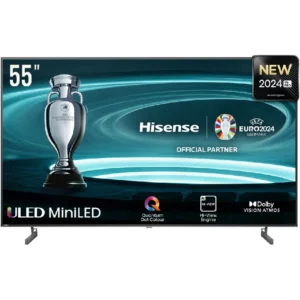
Hisense LED TV 55 inch Smart 55U6N-Pro New
- Model: 55U6N (2024)
- Display Size: 55 inches
- Resolution: 3840 x 2160 (UHD 4K)
- Display Type: Mini-LED ULED
- Smart Platform: VIDAA U5
- HDR: Dolby Vision, HDR10+
- Audio: Dolby Atmos
- Connectivity: HDMI, USB, Wi-Fi, Ethernet, Bluetooth
- Voice Control: Yes (Built-in)
- Warranty: 2 Years Manufacturer’s Warranty.
SKU: n/a -
Networking, Uncategorized
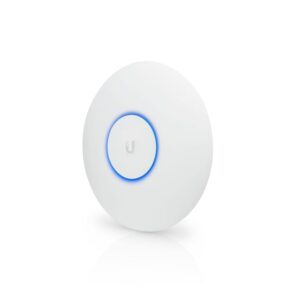
Ubiquiti Access Point UniFi PRO
The Ubiquiti Access Point UniFi PRO UAP-AC-PRO offers blazing-fast 802.11ac WiFi with Wave 1 technology, delivering an impressive 2+ Gbps aggregate throughput rate across its 5 GHz and 2.4 GHz bands. With a range of up to 122 meters (400 feet), it ensures reliable multi-user support even from a distance. Powered by either 802.3af PoE or 802.3at PoE+, this access point features (2) GbE RJ45 ports and (1) USB port for versatile connectivity. Easy to set up and manage via the UniFi Network web application or mobile app, the UAP-AC-PRO is the ultimate indoor/outdoor solution for high-speed, reliable WiFi connectivity.
SKU: n/a








There are no reviews yet.